Procedural Grass with GPU Driven Rendering In DirectX12
Procedural Grass with GPU Driven Rendering In DirectX12
This is a short blog post on how I managed to draw 2 million grass blades in DirectX12 using a GPU driven technique while keeping the overall memory usage relatively low. It assumes the reader has a general understanding of the graphics pipeline to fully grasp the details, but even without that background, it can still be interesting to see how grass is implemented in video games.
Creating our grass blade
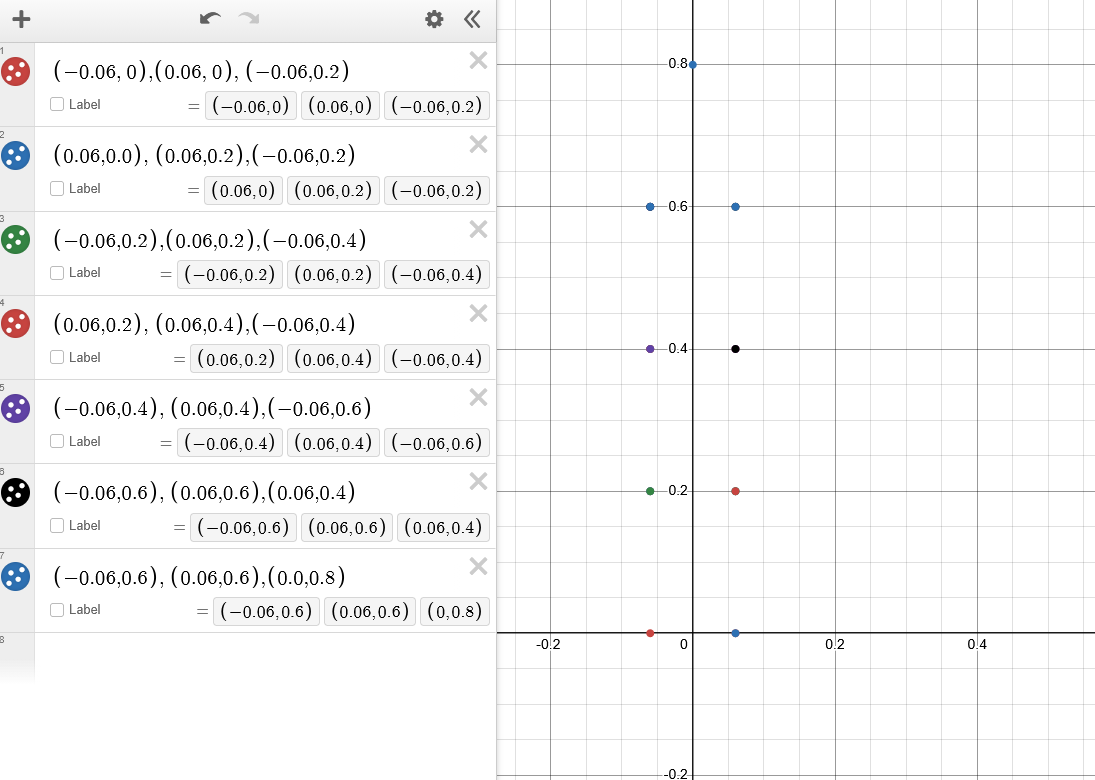
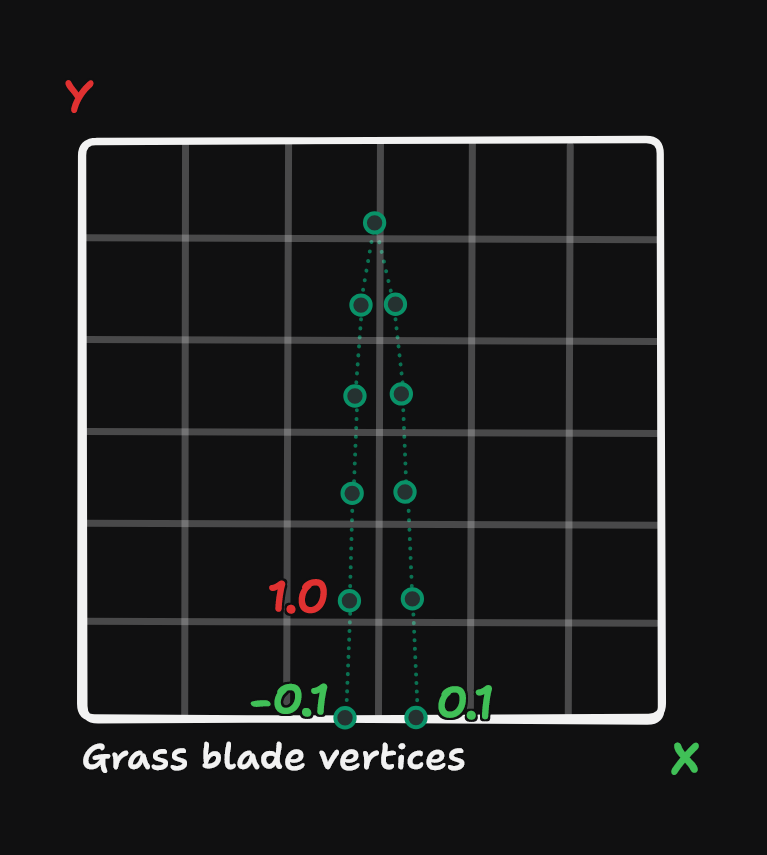
We start of by creating our first grass blade on the CPU, determined by predefined positions in the shape of a blade. We put these position points in a vertex buffer to later use for rendering. The points should represent a straight grass blade, since we will deform them in the vertex shader later on.
Generating the per blade data
The grass blade is currently flat, and we want to reshape it. A trick to do this is by generating random values using a hash function. It is important that the hash function does not repeat quickly in order to achieve a natural look. These generated hash values are used to populate a UAV buffer sized to the total number of grass blades.
1
2
3
4
5
6
7
8
9
10
// Rescale the hash value to be in a 0 to 32 range to use as the position in the chunk later on
float2 randomHash = HashFloat2InRange(DTid.x * chunkID, 0, 32); // 32 units per chunk

// Y up for my engine
float3 position = float3(rHash1.x, terrainHeight, rHash1.y);

// Rotation to radiance
float rotation = HashFloat2InRange(DTid.x * chunkID, 0, 2) * 2 * PI;

float height = HashFloatInRange(DTid.x * chunkID, 0.4, 1.1);
Displacing the vertices of the grass blade
In the vertex shader we use this per blade data buffer as an SRV resource to deform the vertex data so that it represents an actual grass blade rather than a a pointy shape. To give the blade a natural bending form, we use a Bézier curve, which provides fine control over the overall shape.
1
2
3
4
5
6
7
8
9
10
11
12
13
14
15
16
17
18
19
20
21
22
23
float3 bezier(float3 v0, float3 v1, float3 v2, float t)
{
    float3 a = lerp(v0, v1, t);
    float3 b = lerp(v1, v2, t);
    return lerp(a, b, t);
}

[shader("vertex")]
VSOutput main(VSInput input)
{
	GrassData grassData = grassBuffer[input.instanceID];

	float2 bladeDirection = float2(cos(grassData.rotation), sin(grassData.rotation));

	// The input points for the bezier are calculated as followed
	const float leaning = 0.7f;
	float3 v0 = grassData.position; // Fixed position of the grass blade
	float3 v1 = v0 + float3(0.0f, grassData.height * 0.67f, 0.0f); // Up vector
	float3 v2 = v1 + float3(bladeDirection.x, grassData.height, bladeDirection.y) * leaning;

	// We use the current vertex y value as point along the bezier curve
	bladePosition = bezier(v0, v1, v2, initialBladeHeight.y);
}
This gives our blade a nice curve however, there is now one problem. We modified the original vertex, which means the normal is no longer correct. Luckily, there is a simple way to calculate the new normal by taking the derivative of the Bézier curve, as shown below.
1
2
3
4
5
6
7
8
9
10
11
12
13
14
// Bezier Derivitive formula from AMD GPUOpen
// https://gpuopen.com/learn/mesh_shaders/mesh_shaders-procedural_grass_rendering/
float3 bezierDerivitive(float3 v0, float3 v1, float3 v2, float t)
{
    return 2. * (1. - t) * (v1 - v0) + 2. * t * (v2 - v1);
}

// And in the same vertex shader we just apply it like this
float3 up = normalize(bezierDerivitive(v0, v1, v2, initialBladeHeight.y));
// Y up
float3 right = normalize(float3(bladeDirection.y, 0.0f, -bladeDirection.x));

// Cross product to calculate last axis
float3 normal = cross(right, up);
Shading
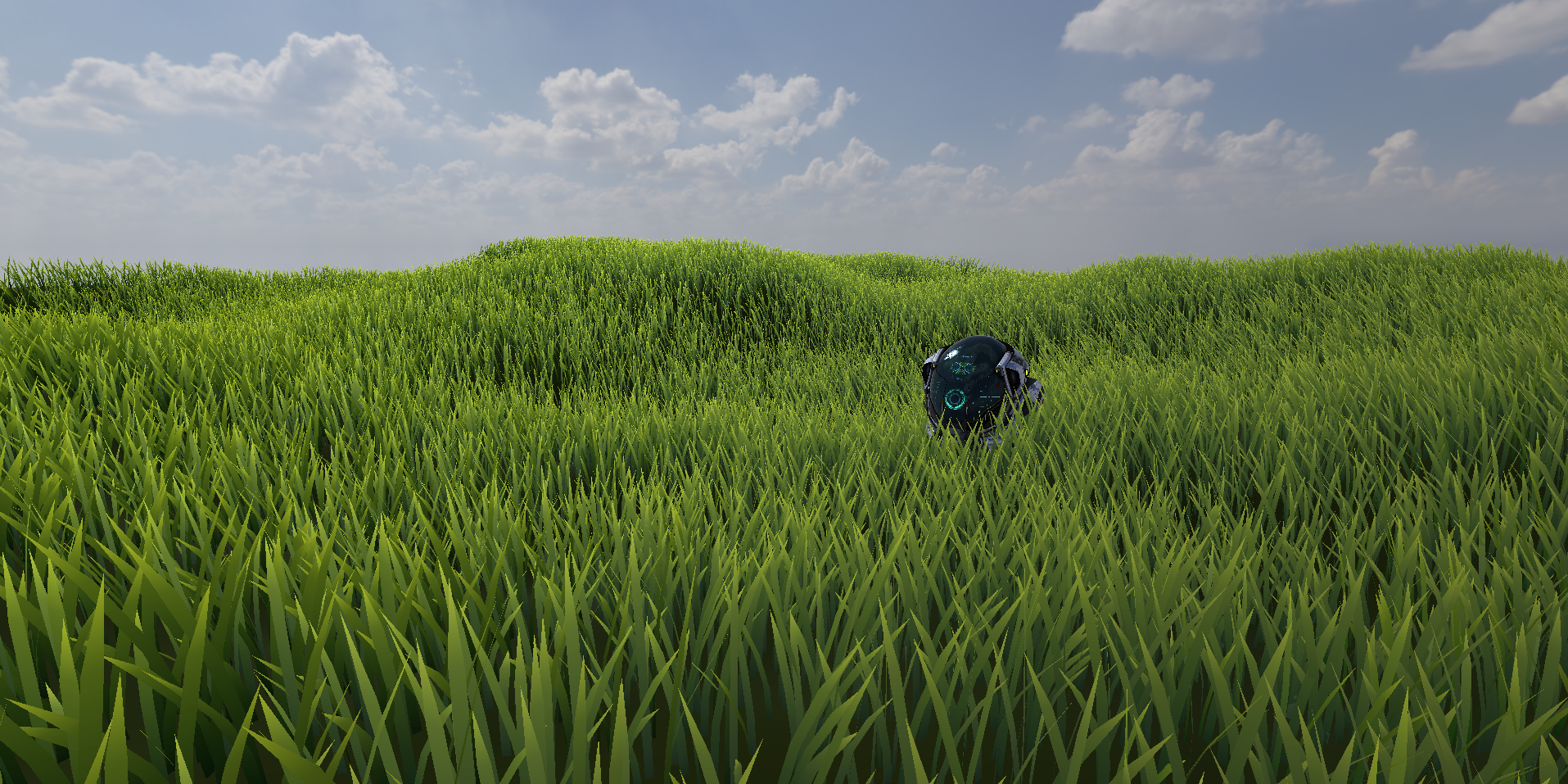
Now that we have the normal, we can shade our grass in the pixel shader. I just hooked my grass to my PBR shader and added simple sub surface scatter effect based on a 1D coordinate where the tip of the blade is thinnest, to enhance the look of the blades, a lot of the implementations use a simplified shading approach with a glossy look and custom ambient occlusion based on grass density.
Flowing wind through the grass
The grass is now static, which doesn’t really sell the idea of real grass. A simple trick to make it look more alive is to offset the top control point of our Bézier curve using Perlin noise. We evaluate the noise function at the blade’s position and scroll it over time in a chosen wind direction, as shown in the code below.
1
2
3
4
5
6
7
8
9
10
11
12
13
14
15
16
17
// Wind calculation
float2 windDir = normalize(windDirection);
float2 windUV = (bladePosition.xz) * frequency + windDir * time;
float windNoise = noise(windUV * octaves) * amplitude;
float3 windOffset = float3(windDir.x, 0, windDir.y) * windNoise * windStrength;

// calculate
const float leaning = 0.7f;
float3 v0 = grassData.position; // Fixed position of the grass blade
float3 v1 = v0 + float3(0.0f, grassData.height * 0.67f, 0.0f); // Up vector
float3 v2 = v1 + float3(bladeDirection.x, grassData.height, bladeDirection.y) * leaning;

// before we calculate the Bezier curve we add the windoffset to the top of the blade
v2 += windOffset;

bladePosition = bezier(v0, v1, v2, initialBladeHeight.y);
This will give us the result bellow:
Scaling the system to 2 million blades
If we want to render even more grass blades, we need to fully utilize the GPU’s capabilities. One way to achieve this is by reducing CPU overhead using DirectX 12’s ExecuteIndirect function, which takes a draw command buffer and an optional count buffer to execute each command in the buffer.
These commands are generated via a compute shader. Before generating the draw commands, we can perform additional optimizations, such as frustum culling and LOD selection, to further improve performance. This work is also done on the GPU using compute shaders, since we want reduce the time the CPU has to communicate with the GPU .
If you want multiple LOD’s, it is recommended to generate two lower detail versions of the grass blade by removing one quad per LOD level and storing all LODs in the same vertex buffer. With indirect rendering, you can easily offset into the vertex buffer to select which LOD to draw in which draw command.
1
2
3
4
5
6
7
8
9
10
11
12
13
14
15
16
17
18
19
20
21
22
23
24
[shader("compute")]
[numthreads(64, 1, 1)]
void main(uint3 id : SV_DispatchThreadID)
{
	if (id.x >= MAXGRASSBLADES)
		return;

	GrassData instance = grassInstance[id.x];

	// Uses frustum bounds stored in a buffer
	if (!IsInFrustum(instance.worldPosition, cullRadius))
		return;

	float distance = length(instance.worldPosition - cameraPos);

	uint lod = GetLODLevel(distance);

	 CulledInstance culled;
	 culled.instanceIndex = id.x; // Thread index to access the correct blade later on
	 culled.lodBlend = lod; // LOD level

	// It is best to store each LOD in a separate culling instance buffer so that they are separated and easily accessible.
	 culledInstances[globalDrawIndex] = culled;
}
We use this LOD and cull data when generating the draw commands in another compute shader.
1
2
3
4
5
6
7
8
9
10
11
12
13
14
15
16
17
18
19
20
21
22
23
24
[shader("compute")]
[numthreads(3, 1, 1)]
void main(uint3 id : SV_DispatchThreadID)
{
// Hard coded my grass indices and vertices offsets and counts
    const uint IndexCount[3] = { 21, 15, 9 };
    const uint BaseVertex[3] = { 0, 9, 16 };
    const uint BaseIndex[3] = { 0, 21, 36 };

    // Draw command setup depending on LOD id.x is the current lod
    DrawCommands[id.x].IndexCountPerInstance = IndexCount[id.x];
    DrawCommands[id.x].InstanceCount = instanceCount.Load(id.x * 4); // 4 byte uint
    DrawCommands[id.x].StartIndexLocation = BaseIndex[id.x];
    DrawCommands[id.x].BaseVertexLocation = BaseVertex[id.x];

    uint instanceOffset = 0;
    for (uint i = 0; i < id.x; i++)
    {
        instanceOffset += instanceCount.Load(i * 4);
    }

// Get the current instance offset to access into the correct culling buffer otherwise the instanced id will start from 0 for every LOD
    DrawCommands[id.x].StartInstanceLocation = instanceOffset;
}
Now that we have the draw commands, there is only one final step: setting them to the correct resource state, D3D12_RESOURCE_STATE_INDIRECT_ARGUMENT. This state indicates that the buffer will be used as an indirect argument resource when calling the ExecuteIndirect function.
1
2
m_instanceCountBuffer[frameIndex]->Transition(list, D3D12_RESOURCE_STATE_INDIRECT_ARGUMENT);
m_drawCommandsBuffer[frameIndex]->Transition(list, D3D12_RESOURCE_STATE_INDIRECT_ARGUMENT);
1
2
3
4
5
6
7
8
9
10
11
12
13
14
15
16
17
18
19
20
21
22
23
// At the start of the program

// Command signature mine only uses the DRAW INDEXED type
D3D12_INDIRECT_ARGUMENT_DESC argumentDesc = {};
argumentDesc.Type = D3D12_INDIRECT_ARGUMENT_TYPE_DRAW_INDEXED;

D3D12_COMMAND_SIGNATURE_DESC signatureDesc = {};
signatureDesc.ByteStride = sizeof(D3D12_DRAW_INDEXED_ARGUMENTS);
signatureDesc.NumArgumentDescs = 1;
signatureDesc.pArgumentDescs = &argumentDesc;

/// Render function after setting all the necessary data

// Call create command signature function
device->CreateCommandSignature(&signatureDesc, nullptr, IID_PPV_ARGS(&m_commandSignature));

list.GetList()->ExecuteIndirect(
	m_commandSignature.Get(), // Command signature
	commandBufferCount, // Max command count
	m_drawCommands[frameIndex]->GetBuffer(), // Sending the argument buffer
	0, // Argument buffer offset
	m_instanceCountBuffer[frameIndex]->GetBuffer(),
	0); // Count buffer offset
Final result
Conclusion
So this is how we can use GPU driven techniques in DirectX 12 to make it possible to draw millions of grass blades without using too much memory. Most of the work, like culling, LOD selection, and creating draw commands, happens on the GPU, which reduces the CPU overhead by a lot. Making use of the Bézier curve and Perlin noise gives of a realistic look of how a grass blade behaves in the wind. There’s still room to improve the shading, but this shows how to make actual grass blades instead of the quads used in most older games to deliver a realistic approach for a real time environment.
I hope this article gave you a good insight into the topic. If you have any questions, feel free to send an email to 230160@buas.nl.
Here are some valuable resources that helped me shape this implementation:
- https://www.cg.tuwien.ac.at/research/publications/2017/JAHRMANN-2017-RRTG/JAHRMANN-2017-RRTG-draft.pdf
- SimonDev
- Procedural grass in ‘Ghost of Tsushima’
- GPU Open
- DirectXSamples
- DirectX12 Graphics Education
- https://learn.microsoft.com/en-us/windows/win32/direct3d12/indirect-drawing-and-gpu-culling-
- https://ahbejarano.gitbook.io/lwjglgamedev/chapter-20
- Aurailus Speaking your GPU’s langauge
This blog post was created by Jim van der Heijden, in my own engine as a self study project during the third year as a student of the Creative Media and Game Technologies course at Breda University of Applied Sciences.